Claude Skills: Extend AI with Reusable Agent Workflows

Transform Claude into a domain expert with Skills - modular instruction packages that teach Claude specialized workflows without consuming your entire context window. Create once, use automatically across conversations.
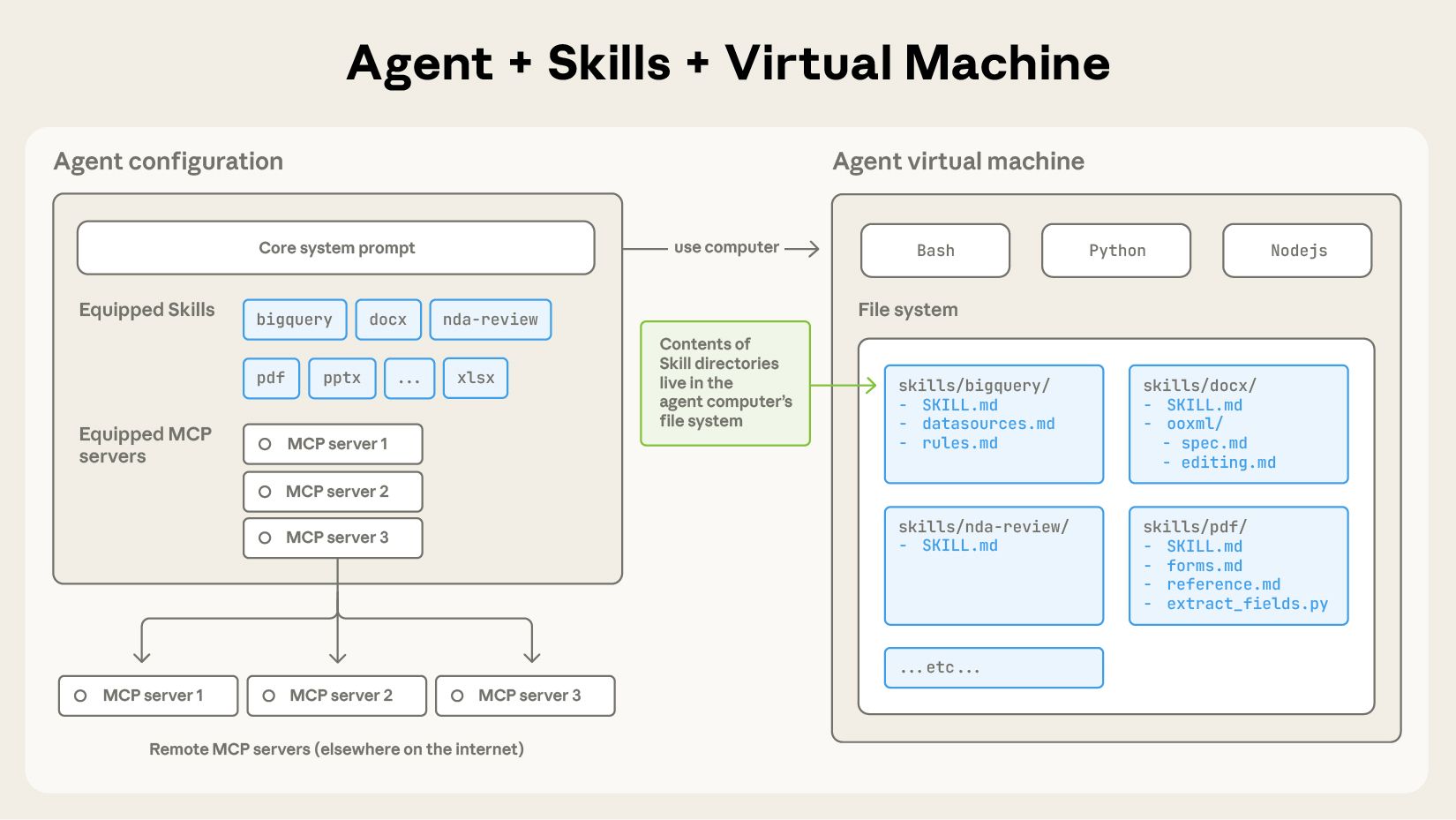
Claude Skills Architecture Diagram
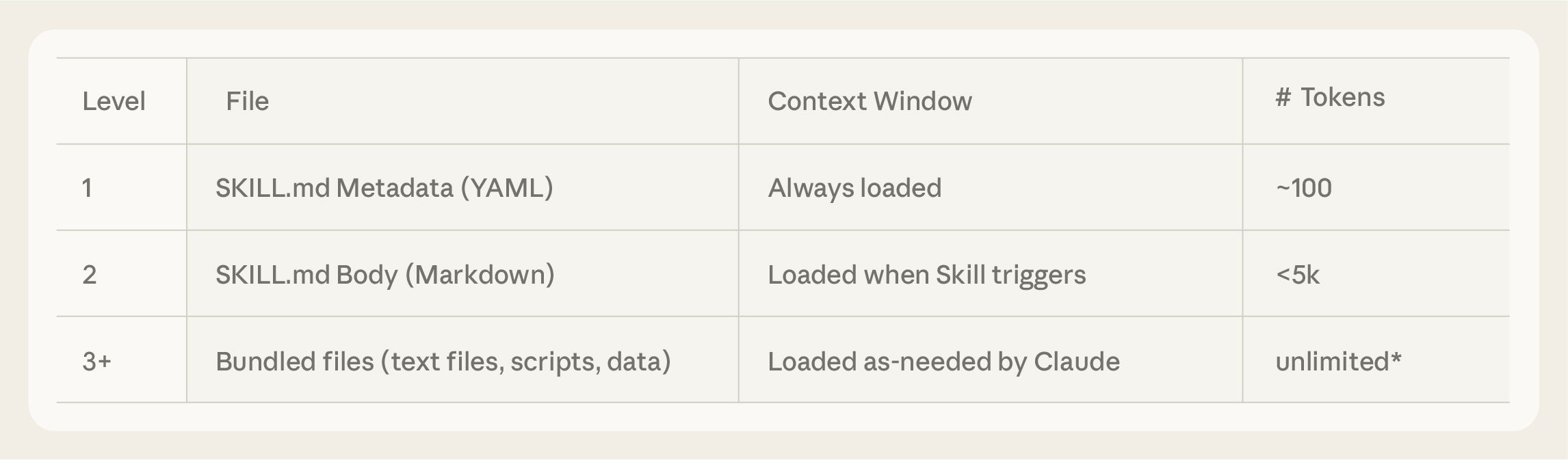
~100 Tokens per Skill Metadata
<5K Tokens for Instructions
4 Pre-built Document Skills
3 Loading Levels

Core Features

Skills leverage progressive disclosure and code execution to extend Claude's capabilities efficiently.

Progressive Disclosure Diagram

Progressive Disclosure

Skills load in three stages: metadata (~100 tokens) loads at startup, full instructions (<5K tokens) when triggered, and additional resources only when needed. This keeps your context window lean.

Skill Anatomy

Code Execution Without Context Cost

Scripts bundled with Skills execute via bash - only the output enters your context window, not the script code itself. This enables complex operations while preserving precious context space.

📄

Pre-built Document Skills

Create and manipulate PowerPoint presentations, Excel spreadsheets, Word documents, and PDFs out of the box. No setup required - just start creating.

🌐

Cross-Platform Availability

Use Skills across Claude.ai, Claude Code, the Claude API, and the Agent SDK. Build once and deploy your specialized agents anywhere.

Limitations & Known Issues

An honest look at what Claude Skills can't do (yet). Understanding these constraints helps you plan effectively.

Limitation Impact Workaround
No cross-surface sync Skills uploaded to API don't appear in Claude.ai and vice versa Upload separately to each platform you need
API: No network access Skills can't make external API calls or fetch live data Pre-fetch data or use MCP for real-time integrations
API: No runtime packages Can't install new Python packages during execution Use only pre-installed packages; check docs for available libraries
Security risks from untrusted skills Malicious skills can exfiltrate data or access filesystem Only use skills from trusted sources; audit code before installation
Demo/educational purpose disclaimer Official examples may differ from production Claude behavior Test thoroughly in your environment before relying on skills

When to Use Claude Skills

Make the right choice between Skills, MCP, and other approaches.

Use Claude Skills When:

  • You have repeatable workflows (reports, documents, data analysis)
  • You want to reduce prompt repetition across conversations
  • You need domain expertise without consuming context
  • You're building specialized agents for specific tasks
  • You work with documents (presentations, spreadsheets, PDFs)

Consider Alternatives When:

  • You need real-time external API access (use MCP instead)
  • Your workflow requires runtime package installation
  • You need immediate cross-platform skill sharing
  • You're working with untrusted third-party skills
  • You need network connectivity in API environment

Claude Skills vs MCP

Understanding when to use each approach for extending Claude's capabilities.

Aspect Claude Skills MCP (Model Context Protocol)
Token Cost ~100 tokens metadata Tens of thousands of tokens
Complexity Markdown + YAML Full protocol specification
Network Access No (API), Yes (Claude Code) Yes
Setup Single folder + SKILL.md Server implementation required
Best For Workflows, documents, expertise External integrations, live data
Learning Curve Low (write markdown) Medium-High (implement protocol)

Use Cases

From document automation to creative workflows, see how Skills transform Claude into a specialist.

📊

Document Automation

Generate branded reports, presentations, and spreadsheets automatically. Apply consistent formatting and templates across all outputs.

🔧

Code Workflows

Implement testing frameworks, code review standards, and deployment scripts as reusable skills. Ensure consistent development practices.

📰

Data Journalism

Access census data, load datasets into SQLite/DuckDB, create D3 visualizations, and follow editorial guidelines automatically.

📝

Enterprise Communications

Generate status reports, newsletters, and internal memos following your organization's specific formats and tone guidelines.

🎨

Creative Tools

Create animated GIFs, apply brand design guidelines, and maintain visual consistency across all creative outputs.

🏢

Domain Expertise

Package industry-specific knowledge, compliance requirements, and best practices as shareable skills for your team.

How It Works

Get started with Claude Skills in four simple steps.

1

Create SKILL.md

Define your skill's name, description, and instructions in a simple markdown file with YAML frontmatter.

name: my-skill
description: What it does
2

Add Resources

Optionally bundle scripts, templates, and reference documents. Claude accesses these only when needed.

scripts/validate.py
templates/report.md
3

Install the Skill

Add via Claude Code plugins, upload to the API, or import through Claude.ai settings.

/plugin install my-skill
4

Use Automatically

Claude detects when your skill is relevant and applies it automatically. No explicit invocation needed.

Just start your task!

Frequently Asked Questions

What are Claude Skills?

Claude Skills are folders containing instructions, scripts, and resources that Claude loads dynamically when relevant to your task. They act as "onboarding guides" that transform a general-purpose AI into a specialized expert without consuming your entire context window upfront.

How do I create a Claude Skill?

Create a folder with a SKILL.md file containing YAML frontmatter (name and description) followed by your instructions in markdown. Optionally add scripts, templates, and reference files. The official Skills repository on GitHub provides templates and examples to get started.

Are Claude Skills free?

Pre-built example skills are available to paid Claude.ai plans. Custom skills you create yourself are free to use. The Skills API requires Claude API access. Note that document manipulation skills (docx, pptx, xlsx, pdf) are source-available but not open source under Apache 2.0.

What's the difference between Skills and MCP?

Skills use ~100 tokens for metadata and are simple markdown files ideal for workflows and domain expertise. MCP (Model Context Protocol) requires implementing a protocol specification, uses significantly more tokens, but enables real-time external API integrations. Use Skills for internal workflows; use MCP for live external data.

Where can I find Claude Skills examples?

The official anthropics/skills repository on GitHub contains example skills for creative design, development, enterprise communications, and document manipulation. The Claude Skills Cookbook on the platform documentation provides step-by-step tutorials for building custom skills.

How do I install Skills in Claude Code?

In Claude Code, run /plugin marketplace add anthropics/skills to add the official marketplace, then browse and install skills using /plugin install skill-name. You can also create local skills by placing them in ~/.claude/skills/ (personal) or .claude/skills/ (project-based).

Can Skills access the internet?

It depends on the environment. In the Claude API, skills have no network access - this is a security constraint. In Claude Code, skills have full network access like any program on your computer. On Claude.ai, network access depends on user and admin settings.

What are the limitations of Claude Skills?

Key limitations include: (1) No cross-surface sync - skills must be uploaded separately to each platform, (2) API environment has no network access or runtime package installation, (3) Security risks from untrusted skills requiring careful auditing, (4) Official examples are for demonstration and may differ from production behavior.

When should I NOT use Claude Skills?

Avoid Skills when you need real-time external API access (use MCP instead), require runtime package installation in the API environment, need immediate skill sharing across all platforms, or are working with untrusted third-party skills that haven't been audited for security.

Are Skills safe to use from third parties?

Exercise extreme caution with third-party skills. Malicious skills can direct Claude to execute harmful code, exfiltrate data, or access your filesystem. Anthropic recommends using only skills from trusted sources - those you created yourself or obtained from Anthropic. Always audit all files (SKILL.md, scripts, resources) before installation.

Start Building Your First Skill

Explore the official Skills repository for templates, examples, and documentation to create your own specialized AI workflows.

View Skills Repository